Historical Persons
A Person is an individual human being: Aḫiu son of Abdi-ili, the man who sold a house at Emar and witnessed two contracts a decade later. It is not a name — it is the historical figure the name refers to, gathered from however many attestations you can justify assigning to them.
The person record is therefore an argument, not an observation. Everything on this page is about building that argument explicitly, and about recording how confident you are in each of its pieces.
Two things a person is not: a name — that is a name form, and two men may share one — and a filiation recorded on a tablet, which is evidence about a text rather than a statement about an individual (see a historical person is not a marked filiation).
List of Persons

1. Creating a person
Creating and attesting are two operations
A person created here has no attestations, and lists show attested persons by default: the record will not appear in the register until at least one occurrence is assigned to it. Use Show all (incl. unattested) to find it in the meantime. This is the general rule of the section — see Adding entries.
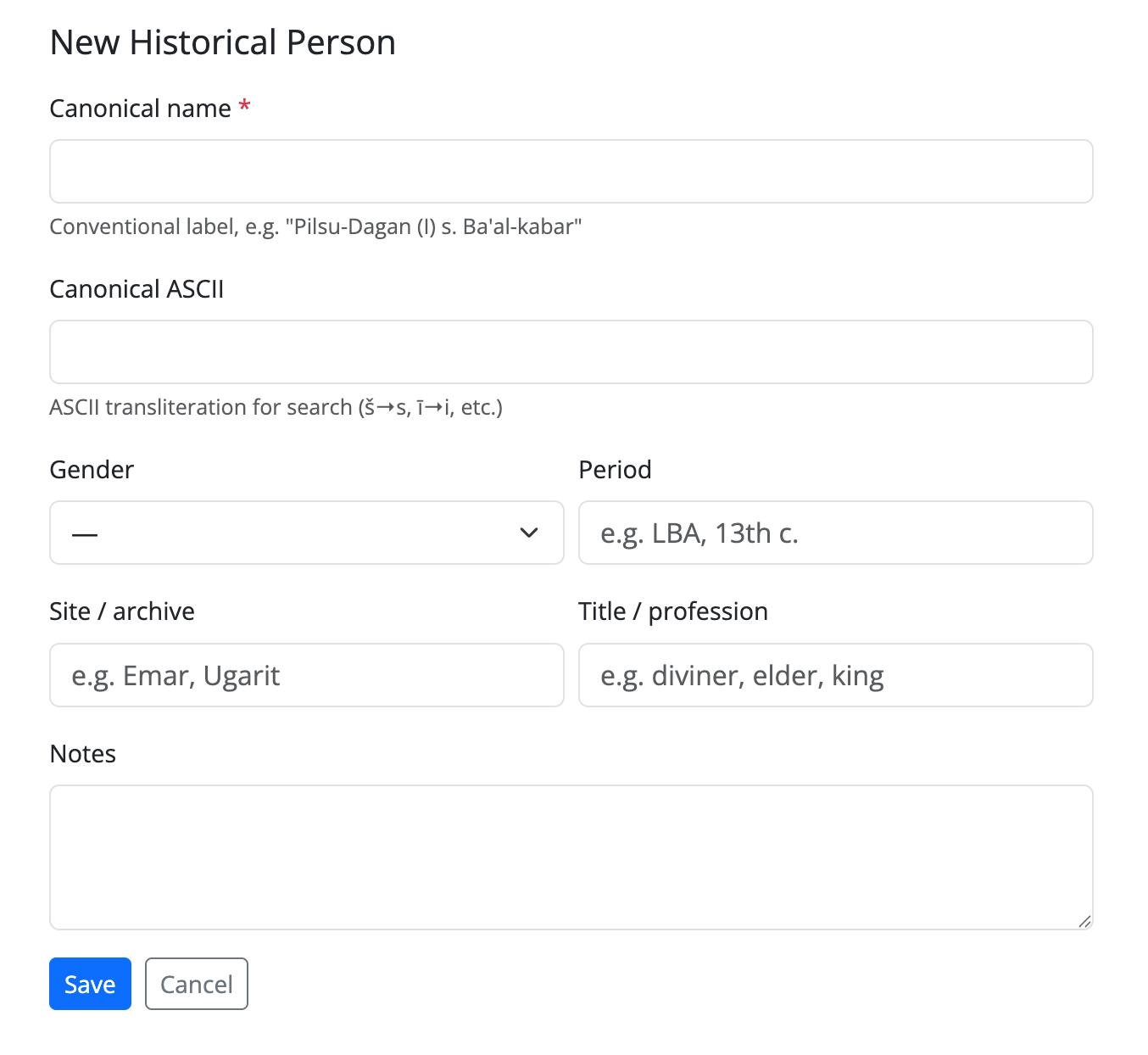
From the person list (/onomastica/prosopography/), use New Person. Only the
canonical name is required:
| Field | Notes |
|---|---|
| Canonical | The name you will use to refer to this individual — required |
| Canonical (ASCII) | Accent-free variant, for search |
| Gender | |
| Period | Free text (reign, phase, absolute dates — whatever your project uses) |
| Site group | The archive you associate the individual with |
| Title | Office or profession, if the individual has a stable one |
| Notes | Free text: the prosopographic argument, references, doubts |
Saving takes you straight to the new person's page.
A new person does not appear in the list — this is expected
The person list shows attested individuals only, because it is built by joining persons to their attestations. A person you have just created has none, so they are absent from the list until you attach the first occurrence.
They are not lost: the page you were redirected to is theirs, and you can always find them again with Show all (incl. unattested) on the list. The person page itself displays a reminder while the attestation list is empty.
Form New Person
2. Attaching occurrences — the two routes
An attestation links one occurrence (one token on one tablet) to one person. There are two ways to create it, and they suit different situations.
2.1 From the tablet
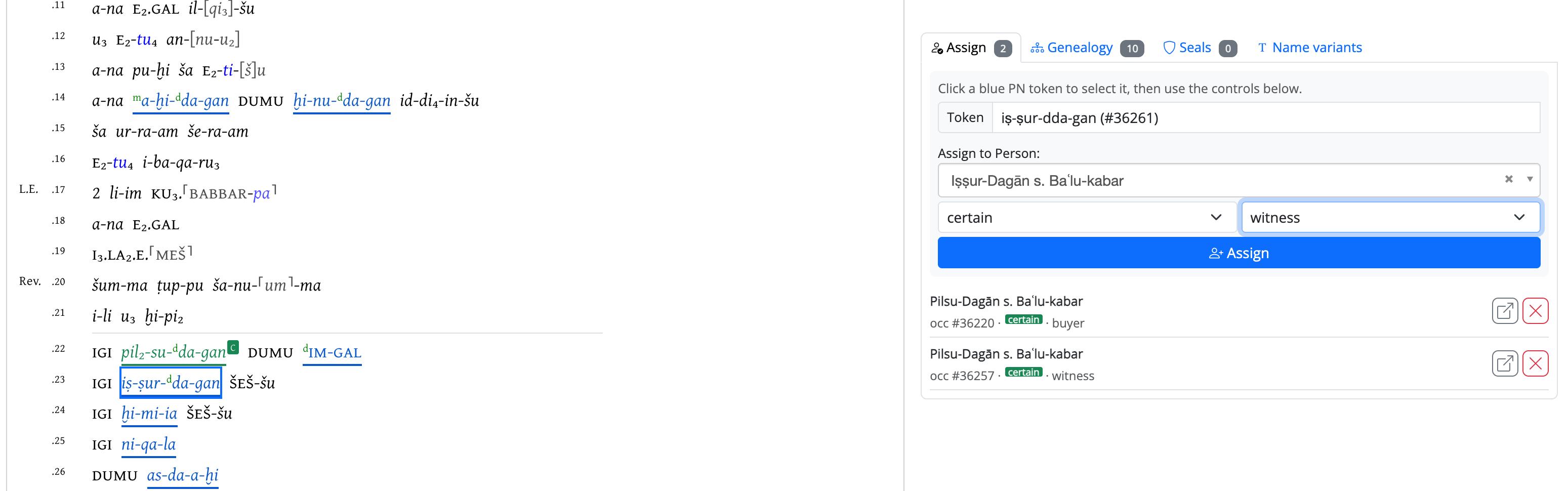
Open a tablet from the catalogue and switch to its Prosopography
view (/tablet/<id>/prosopography). You read the text in full, with the personal-name
tokens highlighted, and assign them in context:
- Click a highlighted PN token — it appears in the Token field.
- Choose the individual in Assign to Person (type to search).
- Set confidence and role (see below).
- Assign.
Assignments already made on the tablet are listed underneath, each with a link to the person and a button to remove it.
This route is preferred because you are looking at the evidence while you judge it: the surrounding text, the other names, the document type. Prosopographic identification without context is guesswork.
Assignement from the tablet
2.2 From the person page — candidates and direct assignment
The person page proposes candidate occurrences: tokens elsewhere in the corpus that carry the same name forms as the ones already linked to this person, expanded through the variant relations between name forms. Each candidate is shown with its line of text, and can be assigned in one click.
This is the efficient route once the person is established — it sweeps up the rest of the dossier after the first identification.
Candidates are empty for a brand-new person
Candidates are derived from the name forms already attached to the individual. A person with no attestations has no name forms, hence no candidates — the column will stay empty however long you wait. Attach the first occurrence from the tablet view (2.1), and the candidates appear.
For the cases neither route covers, Assign occurrence directly takes a raw occurrence id.
Candidates and direct assignment

3. Confidence and role
Every attestation carries two qualifiers, and they do different jobs.
Confidence — how sure are you that this occurrence is this person?
| Value | |
|---|---|
certain |
The identification is not in doubt |
probable |
The default; the identification is well-founded but not proven |
possible |
Plausible, worth recording, not relied upon |
uncertain |
Recorded so it is not lost, explicitly flagged as doubtful |
Uncertainty belongs on the link, never on the person
There is no "doubtful person" flag, by design. The individual either is posited or is not; what is uncertain is whether a given attestation belongs to them. Putting the doubt on the link keeps a well-established person from being contaminated by one shaky attestation — and lets you filter the shaky ones out later.
Role — what is the person doing in this document? buyer, seller, creditor, debtor, guarantor, sender, recipient, witness, scribe, seal owner, diviner, elder, king, adjoining proprietor, and two special values:
patronymic— the person appears only as somebody's father ("PN son of PN")papponymic— only as somebody's grandfather
These two matter later: they mark attestations where the individual is mentioned rather than acting, which is exactly the distinction the family tree uses to decide which texts date a generation. See Genealogy.
4. Reading the person list
| Column | Means |
|---|---|
| Canonical | Link to the person page |
| Gender, Period, Site, Title | As recorded on the person |
| Att. | Number of attestations |
| Rel. | Number of kinship relations asserted for this individual |
Filters: name search, gender, period, and provenance by site group / site. The provenance filters work on the tablets where the person is attested, not on the person's own site tag — filtering by Emar gives you everyone attested at Emar.
List of Persons
Two things about the counters are worth knowing:
Att.counts only tablets you can see. It is filtered by the sites your account is allowed to work on, so the same person can legitimately show a different number to two different accounts.Rel.is not filtered by site. Kinship is recorded between individuals, and an individual has no site of their own. The count may therefore include relations grounded in tablets outside your perimeter — the number only; the relations themselves stay on the person page.
Rel. counts asserted relations, not deduced ones: it matches the primitive edges
listed on the Genealogy tab, and excludes siblings, grandparents, uncles and cousins
that DAPCA derives automatically.
5. Editing and deleting
Edit changes the person's own fields; it never touches the attestations.
Delete refuses while attestations exist. You will get an error naming the number of linked attestations. This is intentional: deleting an individual who has been argued for across several documents should require detaching those documents one by one — a deliberate act, not a side effect. Remove the attestations first (from the tablet Prosopography view or the person page), then delete.